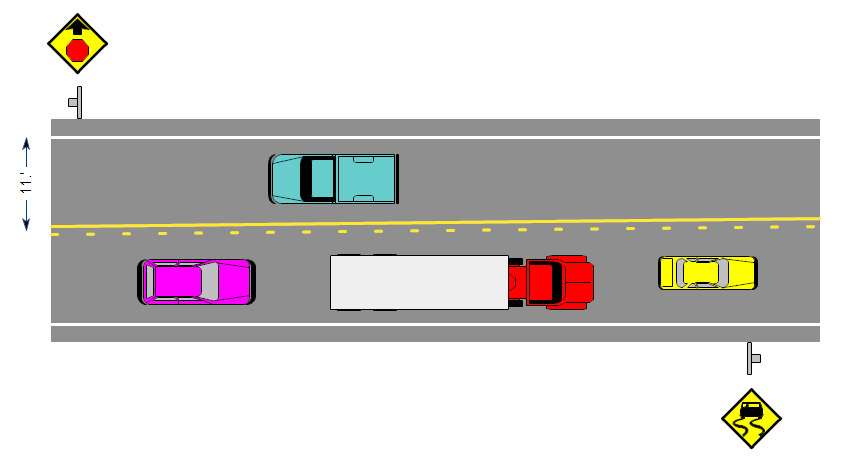
This drawing shows a section of highway. For vehicles going left, there is a
stop sign ahead. For vehicles going right, the surface of the highway can be
slippery when wet.
If you haven't already done so, first
download the
free trial version of RFFlow. It will allow you to open any drawing and make
modifications.
Once RFFlow is installed, you can open the above drawing in RFFlow by clicking
on
Highway.flo.
From there you can zoom in, change the text, change colors, print and fully
customize this sample drawing. It is often
easier to modify an existing drawing than to draw it from scratch.
On the above drawing, each grid unit represents 1 foot. This is established by
clicking on
Tools, and
Dimensions on Lines.
To edit the text, you can either double-click or right-click and choose
Edit Text from the menu that appears.
The highway is a large rectangle from the
Sample stencil filled with a
dark gray color. It is placed in the background so the cars are on top of the
highway. To move shapes to the front or back, right-click on them, choose
Properties,
and go to the
Layers tab. In the bottom of this tab, select the
stacking order.
You can move a line by dragging it or change its length by single clicking on it and
dragging one of the handles. Green handles appear when you click on a shape,
line or curve. Drag these handles to size the object.
To change colors and other properties, right-click on the line or shape and
select
Properties in the menu. To duplicate a line or shape,
right-click on it and choose
Duplicate. To delete a shape or line,
right-click on it and choose
Delete.
In general, you drag objects to move them, left-click to size them, and
right-click to change their text or properties.
To create this drawing without downloading it, run RFFlow and click the
More
Shapes 
button. Open the
Transportation folder and click on the
Roads stencil. Then click the
Add Stencil button.

 Loveland CO 80539-1244 USA