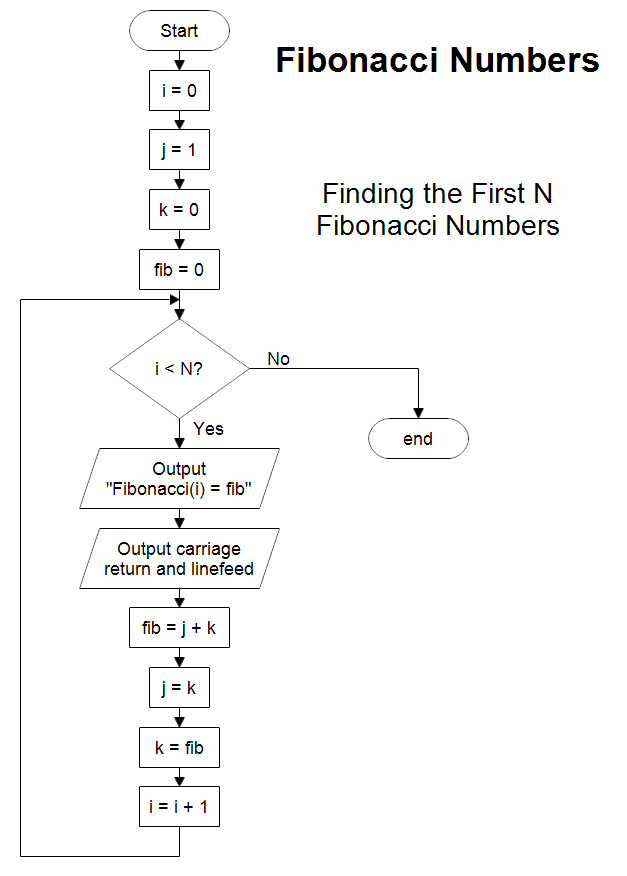
This flowchart answers the question "How do you draw a flowchart to
calculate the first N Fibonacci numbers?" If N is 20, then you get
Fibonacci numbers 0 through 19. The Fibonacci series are the numbers:
0, 1, 1, 2, 3, 5, 8, 13, 21, 34, 55, 89, 144, ...
By definition the first two numbers are:
Fibonacci(0) = 0
Fibonacci(1) = 1
The next number is always the sum of the previous two.
Fibonacci(n) =
Fibonacci(n-1) + Fibonacci(n-2)
Fibonacci(2) = 0 + 1 = 1
Fibonacci(3) = 1 + 1 = 2
Fibonacci(4) = 1 + 2 = 3
Fibonacci(5) = 2 + 3 = 5
Fibonacci(6) = 3 + 5 = 8
Fibonacci(7) = 5 + 8 = 13
Fibonacci(8) = 8 + 13 = 21
Fibonacci(9) = 13 + 21 = 34
Fibonacci(10) = 21 + 34 = 55
Fibonacci(11) = 34 + 55 = 89
Fibonacci(12) = 55 + 89 = 144
Fibonacci(13) = 89 + 144 = 233
Fibonacci(14) = 144 + 233 = 377
...
The output statements in the flowchart show the value of i and the Fibonacci
number fib. You would print or display one line and then go to the next as shown
below.
Fibonacci(0) = 0
Fibonacci(1) = 1
Fibonacci(2) = 1
...
The flowchart above goes through each number in the series. You could use it to
find an arbitrary number. However, there might be a faster way. If you just
wanted the Fibonacci Number for some index i, Fibonacci(i), do you have to go
through the series starting with 0, or can you think of a direct solution? Given
the input number i, draw a flowchart that quickly finds the output Fibonacci(i).

Professional Flowcharting Software
|
|
|
|
|
|
|
|
 button. Scroll to the Flowcharting folder and click the plus sign to open it.
Click the Basic Flowcharting stencil and then click the Add Stencil button.
button. Scroll to the Flowcharting folder and click the plus sign to open it.
Click the Basic Flowcharting stencil and then click the Add Stencil button.
 Loveland CO 80539-1244 USA