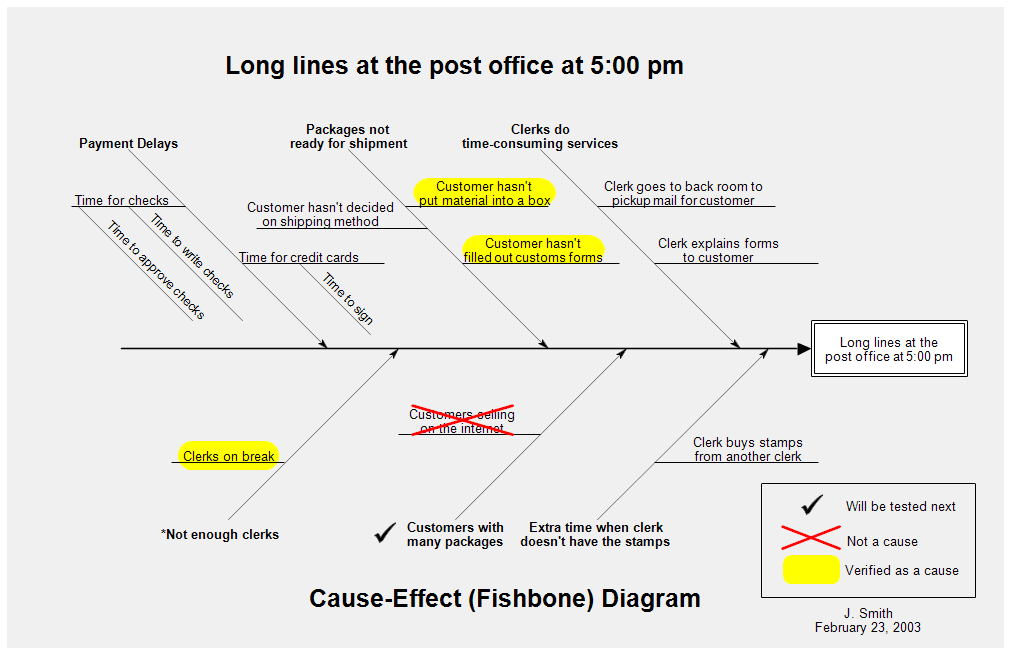
Cause-and-effect diagrams are also called Ishikawa diagrams after their creator,
Dr. Kaoru Ishikawa. These diagrams are used in identifying and organizing the
possible causes of a problem. They are sometimes referred to as fishbone
diagrams because they resemble the skeleton of a fish, with a head, spine, and
bones.
The problem to be solved is placed in the box on the far right. It should be a
well defined problem with a narrow focus, or the chart will get too large. The
spine is a large horizontal arrow that points to the problem box.
The lines diagonally pointing to the spine are the main categories of
potential causes of the problem. The smaller lines are more detailed causes of
the problem.

Professional Flowcharting Software
|
|
|
|
|
|
|
|
 button. Scroll to the Cause-Effect (Fishbone) stencil, click it, and
then click the Add Stencil button.
button. Scroll to the Cause-Effect (Fishbone) stencil, click it, and
then click the Add Stencil button.
 Loveland CO 80539-1244 USA