| Professional Flowcharting | Home | Samples | Overview | Download Trial | Tutorial | Purchase | Upgrade | Support |
| Gantt Charts and Project Schedules |
| Gantt charts show task and schedule information. The tasks are usually
numbered and listed vertically. A bar shows the starting date and projected
completion date of each task. Color or shading is sometimes used to show how
much of each task has been completed. A Gantt chart is a management tool and a
communications tool.
These charts can be downloaded and edited. It is often easier to modify an existing chart than to draw a new one. If you haven't done so already, download the free trial version of RFFlow. Once it is installed, you can open the samples on this page directly in RFFlow by double-clicking the links to the right of each picture. From there you can zoom in, edit, and print the sample chart. (Users of Netscape Navigator 6 should right-click on the file and select Save Link As...) |
| Gantt Chart - Project Schedule | ![]() |
Click to enlarge image
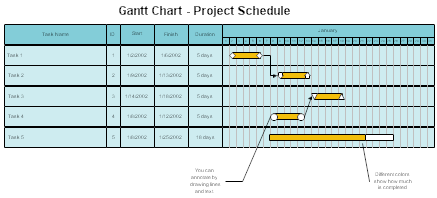
Download gantt1.flo (37 KB) This chart includes columns for the Start, Finish, ID, and Duration of each task. See the tutorial How to Draw a Gantt Chart. |
| Gantt Chart - Project Schedule | ![]() |
Click to enlarge image
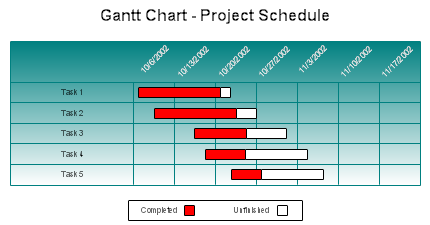
Download gantt2.flo (34 KB) For each task the red portion shows how much of that task is completed. See the tutorial How to Draw a Gantt Chart. |
| Gantt Chart - Project Development | ![]() |
Click to
enlarge image
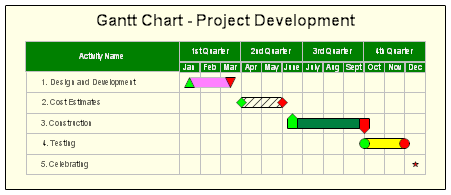
Download project_development.flo (38 KB) In this chart the different tasks have bars of different colors. Green represents the beginning of a task and red the completion. See the tutorial How to Draw a Gantt Chart. |
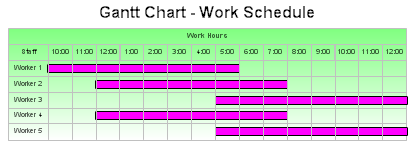
| Gantt Chart - Work Schedule | ![]() |
Click to enlarge
image
Download workschedule.flo (35 KB) This chart shows what hours each worker works. It allows one to quickly determine how many workers are present during the day. For example, from 5:00 to 6:00 all 5 workers are present. See the tutorial How to Draw a Gantt Chart. |
| Register | Documentation | Privacy and Security | Version Information | Free Additional Shapes | Software Resellers |
| RFF Electronics |
| PO Box 1244 |
| Copyright © 1996-2008 RFF Electronics. All rights reserved. |