RFFlow is everything you need to start communicating your ideas with
professional-quality charts and diagrams. For presentations, printed
documents, or the Web, great looking diagrams have never been
so easy to accomplish.
Move Your Chart into Other Applications
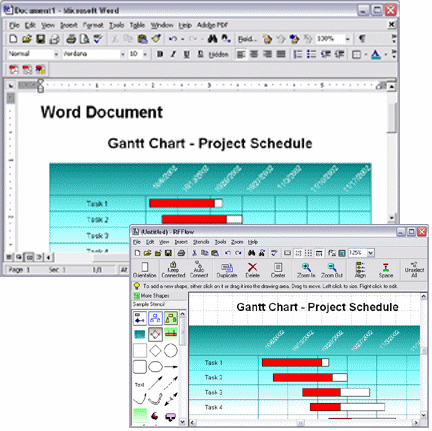
RFFlow works well with Microsoft Office and Corel
WordPerfect Office. After drawing your chart, you can copy and paste it into
Microsoft Word

,
Microsoft PowerPoint

,
Corel WordPerfect

,
or any other Windows Application. RFFlow supports Object Linking and Embedding in
Windows as an OLE Server. This makes it very easy to use RFFlow diagrams in
other Windows programs. You simply copy the chart to the Clipboard and paste
it into the destination Windows application. You can embed or link your chart.
In both cases, you can edit the chart by double-clicking on it in the
destination application.
Charts and Diagrams
RFFlow can produce a wide variety of flowcharts, organization charts, and
diagrams. We have listed many of them below. To see actual charts, check out the
Samples page. These charts can be used as templates for your own charts.
- Audit Charts
- Block Diagrams
- Cause-Effect (Fishbone) Diagrams
- Computer/Network Design
- Criminal Investigation Diagrams:
- Activity Flowcharts
- Commodity Flowcharts
- Event Flow and Timelines
- Link Analysis
- Telephone Analysis
- Database Definitions
- DIN66001 Flowcharting
- Electrical/Electronic Schematics
- Entity Relationship Diagrams
- Floor Plans:
- Home Layout
- Office Layout
- Flowcharts
- Fluid Power Design
- Gantt Charts
- Genetic Pedigree Charts
- Graham Process Flow
- Greek Alphabet
- IDEF0, IDEF1X
- Industrial Diagrams
- Organization Charts
- PERT, CPM, CPA Charts
- Physical Flowcharting
- Quality System/ISO 9000 Charts
- SDL Charts
- Software Design, including:
- UML
- Booch OOD
- Express G
- Gane/Sarson
- Data Flow
- Martin ERD
- Rumbaugh OMT
- Shlaer-Mellor OOA
- Structure Charts
- Yourdan Data Flow
- Timelines
- Transportation Objects
- Work Breakdown Structures
- Web Pages ... and more!
It's Easy to Draw and Edit Charts with RFFlow
Even if you've never used a drawing tool before,
it's very easy to create flowcharts and diagrams with RFFlow. To add a shape
to your chart, click on the shape in a stencil, type in the text, and click
the
OK button. Then drag the shape to position it. Or, simply drag a
shape from a stencil to your chart. Shapes in RFFlow will automatically size
around your text.
All of the most frequently used commands in RFFlow are at easy reach on a
large toolbar. You can quickly move, duplicate, delete, and edit the shapes
and lines in your chart. A prompt line provides assistance. RFFlow has a
multilevel undo capability.
To move around in your chart, use the standard scrollbars in the window,
use the arrow keys, or drag the chart with the right mouse button. If your
mouse has a wheel, it will work too. You can zoom in to see the details of
your chart, or zoom out to see the complete chart.
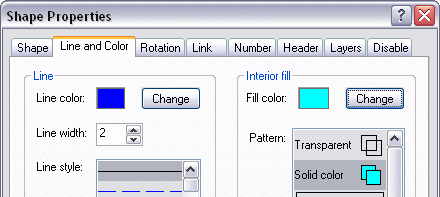
Right-click on a shape or line and choose
Properties. You can change
the color, width, and style of a shape's lines and change the color and style
of the interior fill. You can select gradient fills and hatched patterns for
shapes. With each color you can select an alpha transparency that allows the
background to show through a shape. Line and curves drawn in RFFlow are
antialised giving them a smooth appearance. You can also size or rotate a shape,
add a shadow to a shape, add a shape number,
make a shape a header or footer, link a shape to a file, assign a shape to a
layer, set a stacking order, or change a shape to another shape. These
operations can also be performed on a group of selected shapes.
Shapes, Lines, and Text
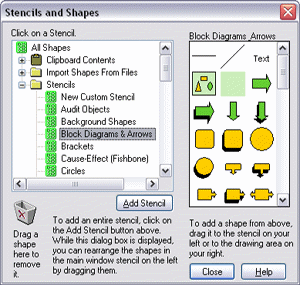
RFFlow includes over 1600 shapes that are
carefully organized into stencils designed for specific tasks. The stencils
are arranged in an expandable list that allows you to quickly find the stencil
or shape you want. Each shape has a ToolTip displaying its name or
description. When you purchase an RFFlow License, you get all the shapes.
You can use the RFFlow stencils or create your own custom stencils with
just the shapes and lines you need. You can import bitmaps and clip art
pictures from files or from the Clipboard and add them to a custom stencil.
You can also draw your own custom shapes in RFFlow and add them to a
stencil.
Lines in RFFlow can be horizontal, vertical, diagonal, or curved. They can
be solid, dotted, or dashed and can be any color. You can choose from a large
selection of arrowheads of different sizes, shapes, and styles.
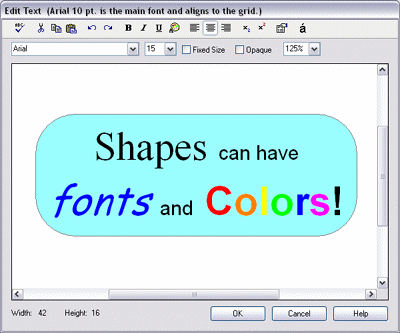
Text is entered and formatted just like it is in your word processor.
RFFlow allows you to use multiple fonts and font sizes. The text editor
includes bold, italic, underline, color, tabs, subscripts, superscripts,
spelling, left, center, and right alignment, special characters, undo, redo,
copy, cut, and paste. Each shape can hold up to 5000 characters.
Save Charts to Picture Files
RFFlow charts can be saved to disk in the
following formats: BMP, EMF, EPS, GIF, HTML, JPEG, PLT, PNG, TIFF, and WMF.
This makes it easy to share your charts with others. Simply save your chart as
a PNG and attach the chart to your email. If you own Adobe Acrobat, you can save charts in PDF format. You can
create Web pages by saving as an HTML file and shapes within the chart can
have hyperlinks to other Web pages.
Insert Pictures into Your Charts
The Insert menu item in RFFlow allows you to
easily insert pictures into your chart. You can insert pictures in the
following formats: BMP, EMF, GIF, ICON, JPEG, PNG, TIFF, and WMF. You can also copy and paste pictures
from the World Wide Web or other sources into RFFlow.
Intuitive Features
RFFlow has intelligent features that make common
tasks easy and automatic and give you the flexibility you need for your work.
With Auto Connect, you simply click on two objects and RFFlow will draw the
line to connect them. The Keep Connected button allows you to keep shapes
connected as you move them, with the lines stretching or shrinking like rubber
bands. All objects automatically snap to grid points, making lining up shapes
a very simple task. An automatic alignment feature positions new objects with
respect to those already drawn. RFFlow can automatically number the shapes in
a chart as you draw them. All the lines in a chart can be edited to mark
intersections with crossovers and to round sharp corners. When moving shapes
near the edge of the RFFlow window, the chart will automatically scroll. Your
completed chart can be automatically sized to fit on a page.
You can draw enormous charts in a 10-foot by 10-foot drawing area that
include up to 65,000 objects and can span up to 64 pages. RFFlow includes a
full-function spelling checker and Find and Replace. You can make headers and
footers that include page numbers, the filename, the date, and time. Headers
can be composed of any number of shapes, lines, or curves.
With RFFlow, you can link shapes in your chart to other RFFlow charts,
files on your computer, or locations on the Internet. These linked shapes then
run other programs or open files when clicked. Click on a shape and you open a
chart. This lets you make a hierarchy of charts, each showing more of the
details. These hyperlinks are preserved if you save the file as an HTML page.
This allows you to have a chart on your Web site which jumps to other Web
pages when you click on shapes.
Emailing Your Charts to Others
You can easily attach RFFlow charts to outgoing
email messages. The recipients simply double-click the attached flowcharts to
open the files if they have RFFlow. If the recipients are not RFFlow users,
they can
download the free viewer version of RFFlow. It
allows one to view and print any RFFlow chart. Another way to
email your RFFlow charts is to save your charts as a GIF, PNG, or JPEG and attach
them to the email. All computers can open GIFs, PNGs, and JPEGs. PNG is
usually the best for flowcharts. If you have Adobe Acrobat, you can print your
RFFlow chart to a PDF file.
Comprehensive Help, Documentation, and Support
RFFlow has an in-program help system. Click on
Help in the
main menu of RFFlow. RFFlow Help includes tutorials on drawing a flowchart and
an organization chart. Each dialog box in RFFlow has a Help button that leads
you to assistance specific to your current task.
A Quick Reference card and the RFFlow User's Guide can be downloaded for
free from
www.rff.com/documentation.
The Quick Reference card contains all the
information you need to draw, edit, and print your first chart or diagram in
minutes. The 80-page RFFlow User's Guide has complete documentation on all of the
functionality within the program.
You can also view and print all the shapes included with RFFlow from this web page
RFFlow
Shapes. To search for a specific shape, click
Search at the top of this Web page.
RFF Electronics provides free and unlimited technical support for RFFlow.
Simply call 970-663-5767 or email us at
help@rff.com,
and we'll be happy to assist you.
System Requirements and Installation
RFFlow Version 5 requires Microsoft ® Windows
XP, Vista, Windows 7, Windows 8, Windows 8.1 or Windows 10. If you are running any of these operating systems
and have a Windows-compatible mouse or pointing device, your system has
already met all the requirements necessary to run RFFlow. RFFlow will not
run on a Mac unless you have an emulator for Microsoft Windows or can boot
your Mac into Microsoft Windows.
Installing RFFlow on a personal computer is easy. The RFFlow program is downloaded so you
can get started immediately. A full installation of RFFlow requires
less than 10 megabytes of hard disk space. RFFlow has complete printer and
plotter support; if a printer or plotter is installed in Windows, it will work
with RFFlow.
Download the Free Trial Version
To use RFFlow yourself, we encourage you to
download
the free trial version. It last 30 days and is identical to the full version. After 30 days it becomes
a viewer so you can open and print your charts.


 Loveland CO 80539-1244 USA