
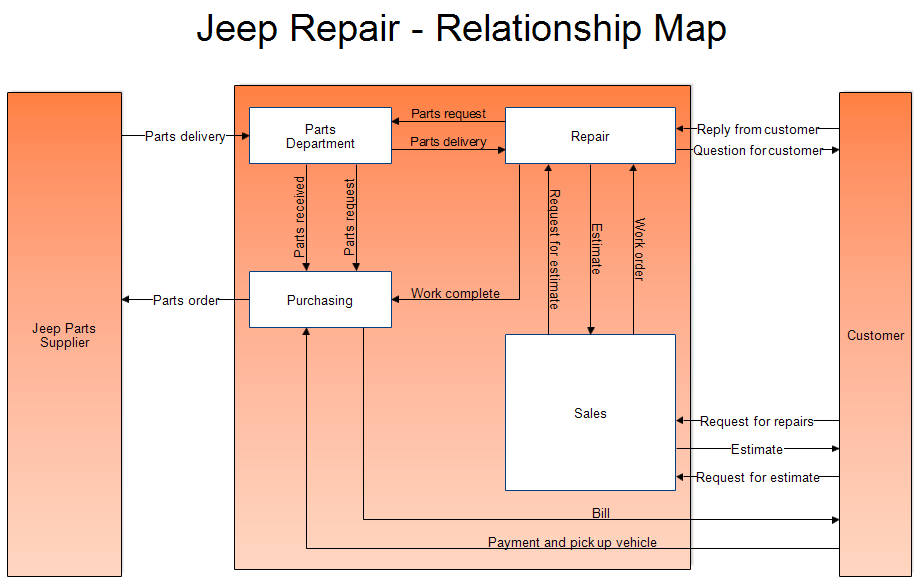
- Your Group. Your group is represented by a rectangle in the middle of the chart. It can be a company, division, section, department, or whatever. In the above example, the group is a company that repairs Jeeps.
- Suppliers. On the left you draw a rectangle representing your suppliers. In the above chart, the only supplier is the Jeep Parts Supplier. If you had several suppliers, they would go into white boxes inside the orange rectangle. The lines coming from the suppliers show what they supply. The Purchasing group orders parts and they are delivered to the Parts Department.
- Customers. On the right is a box that shows your customers. The lines from your group box to the customers show what you supply them and what they might ask from you.
- Sub-Groups. If your group is large, it may have several sub-groups which may have inputs and outputs between the sub-groups. This is all shown within the central group rectangle. The sub-groups in the Jeep repair shop are Sales, Repair, Parts Department, and Purchasing. Arrows show the inputs and outputs of each of these departments. If you have too many sub-groups, you may want to draw a relationship map for each sub-group.
A relationship map of a company may be helpful to a new employee to show them what it is the company produces and what are the raw inputs to the company.
What to look for in a Relationship Map.
- Are all inputs and outputs between groups shown?
- What is required for each input or output. Is it a paper document, email, or physical item?
- What are the external interfaces? These are the most important to your company.
 Loveland CO 80539-1244 USA