These charts can be downloaded and edited. It is often easier to modify an
existing chart than to draw a new one.
. Then you can open the samples on this page
directly in RFFlow by clicking on the .flo file links below. From there you
can zoom in, edit, and print the sample chart.
Many of the shapes used on this page are in the Block Diagrams and Arrows
stencil. To open this stencil, click the
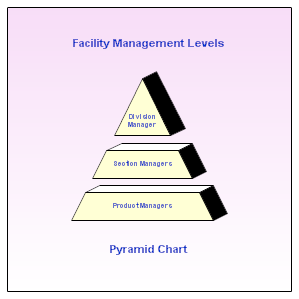
Pyramid charts are used to show hierarchical lists. You can use them to
show business goals or customer requirements. The most important item is
usually placed at the top of the pyramid.
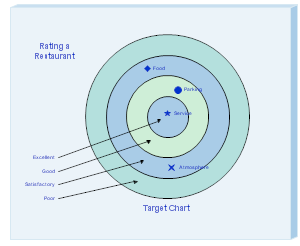
A target chart allows you to rate items by placing them in one of
several concentric circles. The center is the highest position.
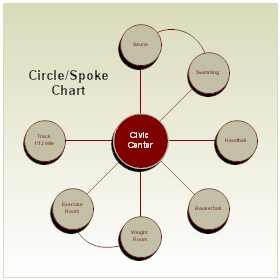
Spoke charts have a central item surrounded by other items in a circle.
These charts can be used to show the features or components of the central
item. Curves are drawn between related components.
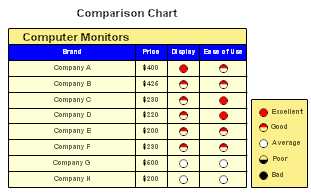
Comparison charts are used to compare products by rating their
features.
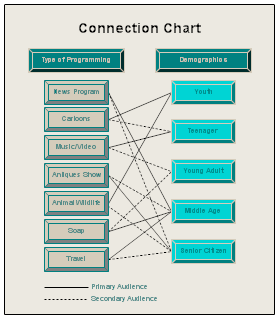
This connection chart lists different types of television programming
on the left. These include news programs, cartoons, music/video programs,
etc. On the right is a list of different age groups. A solid line connects
the primary viewers with a program type. A dotted line connects the
secondary viewers with a type of programming.
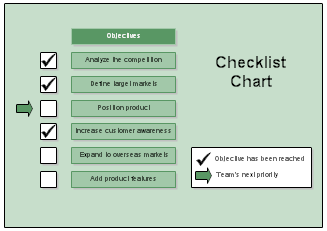
A check beside an item means that item has been completed. An arrow
shows the next item to be worked on.
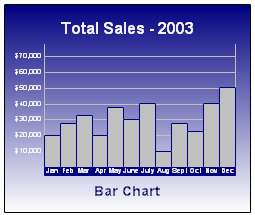
In drawing bar charts, you may want to add the Gantt stencil. It
includes shapes for the months, years, and quarters which also show up on
bar charts.
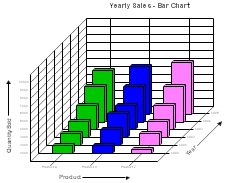
This bar chart shows the total sales for three different items between
1990 and 1995.
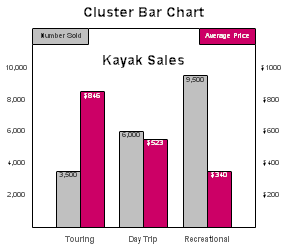
This bar chart shows the number of kayaks sold and the average price
for three different types of kayaks.

 in RFFlow, Block Diagrams and Arrows, and Add Stencil.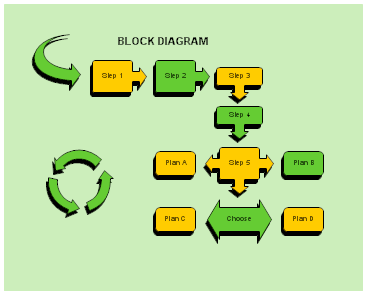
 Loveland CO 80539-1244 USA